
AI Powered Apply Any Image's Style to Your Photo
Upload your photo and a style reference — a painting, a film still, an illustration — and the AI repaints your photo in that look.
Free trial credits. No watermark.
Transfer a Style in 3 Steps
Use any picture as your filter.
Upload the Style Reference
Any image whose look you like: a painting, an anime frame, a vintage film photo, a poster.
Why Use AI Style Transfer?
Filters give everyone the same look. A reference image gives you exactly yours.
Any Image as a Style
No fixed filter list — use any artwork, frame or photo as the reference.
Subject Kept Recognizable
Composition, faces and key shapes from your photo are preserved while the style is applied.
Palette, Texture and Mood
Colors, brushstrokes, grain and lighting mood are transferred together for a coherent result.
Real Generated Examples
Two Subjects, Two Different Visual Treatments
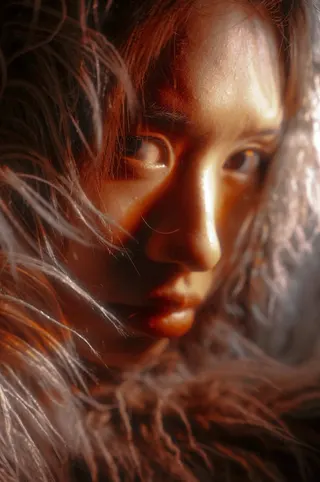
The first image supplies the subject and the second supplies the reference mood. Compare how color and atmosphere change while the broad portrait remains recognizable.
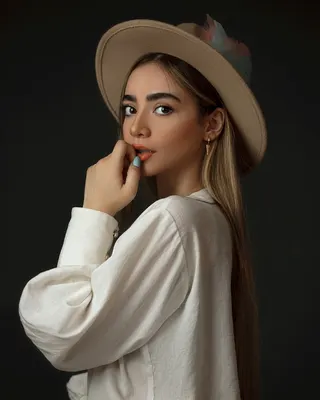
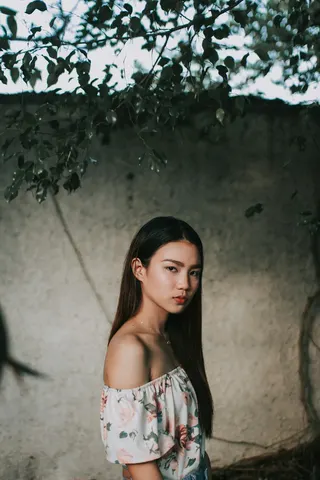
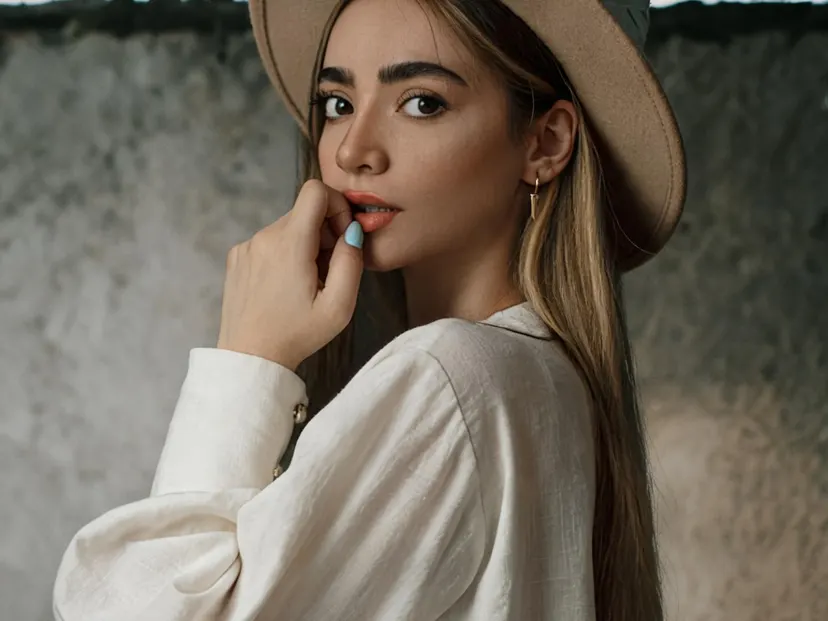
A clean portrait with a soft editorial treatment
The reference guides a restrained, polished look with coordinated color and a clear face rather than overwhelming the subject with texture.
Input photos: Raamin ka · Jim Flores
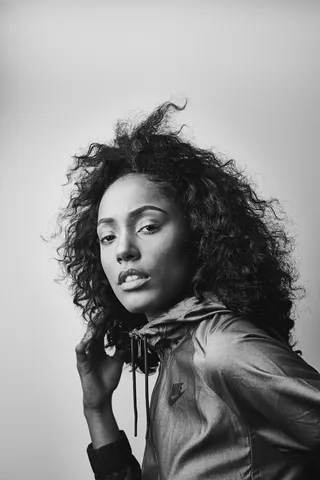
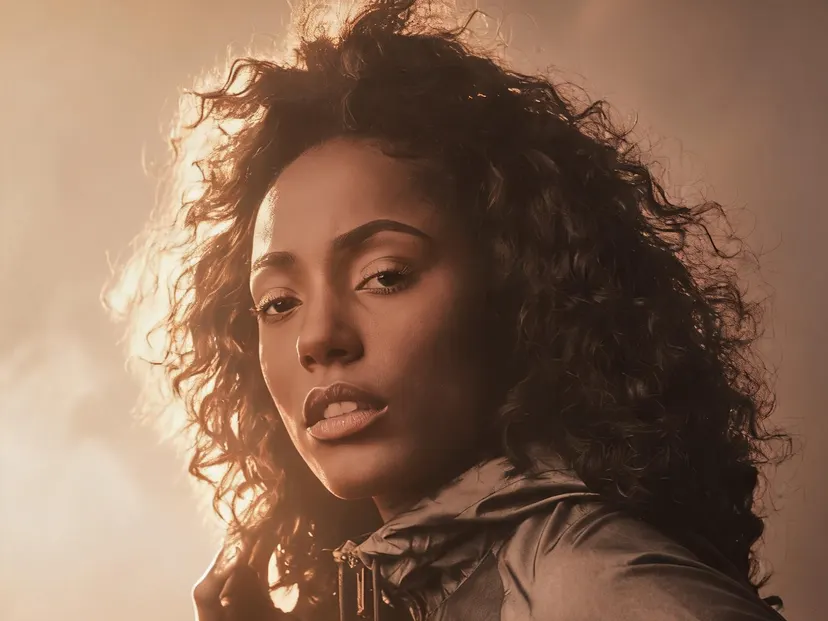
Warm cinematic color and dramatic light
The second reference inspires a warmer, more dramatic rendering. Review the eyes, hair and facial detail when using a strong style.
Input photos: Project 290 · Dynamic Wang
Style Transfer Guide
Borrow a Visual Style Without Losing the Original Subject
Style transfer is a balance between transformation and recognition. The reference should influence the image’s visual language without replacing what the first photo is about.
Understand the roles of the two uploads
The first image supplies the subject and composition. Choose a photo with a clear focal point and shapes you want to remain recognizable. Portraits, pets, products and simple landscapes are easier to transform than cluttered scenes with many overlapping objects. Strong subject separation gives the model more freedom to reinterpret color and texture.
The second image supplies style: its palette, mood, brushwork, lighting and overall visual treatment. It does not need to contain the same subject. A cinematic portrait can lend dramatic color, while a painted landscape can inspire visible texture. Pick a reference with a distinctive look rather than one that is merely high resolution.
Choose references with specific visual characteristics
Look for a small number of strong traits. Warm orange light, deep blue shadows, soft watercolor edges, bold screen-print shapes or grainy black-and-white contrast are all easier to recognize in a result than a vague request for ‘artistic’. If the reference contains several conflicting styles, the output may borrow the wrong one or average them into something less distinctive.
Keep subject compatibility in mind. A delicate watercolor reference may suit a quiet landscape but make small product text unreadable. Heavy geometric abstraction can be exciting for a portrait, yet it may remove the facial detail you wanted to preserve. Test the broad transformation at 1K before spending more credits on a detailed render.
- Use references you own or have permission to use.
- Avoid depending on an artist’s name when a visual description will do.
- Check whether text, logos and facial details survive the chosen style.
More AI Photo Effects
Same two-photo workflow, different results — pick the effect that fits your photos.

AI Couple Photo
Turn two separate photos into one natural couple portrait — perfect for long-distance couples.

Add a Person to a Photo
Add someone who wasn't there — group shots, family portraits or a missing loved one.
Virtual Try-On
See any clothing item on a real person from just two photos — fit and fabric preserved.
AI Product Photo
Place your product into any lifestyle scene with matching light and shadows.
AI Travel Photo
Put yourself in front of any landmark or landscape — matched sunlight and shadows.

AI Pet Photo
Combine you and your pet — or two pets — into one adorable shared portrait.
Before and After Photo
Turn two photos into one seamless before-and-after image — or a free side-by-side.
Put Two People in One Photo
Combine two people from separate photos into one natural picture — friends, family or anyone.
AI Style Transfer — FAQ
Answers about reference images, subject recognition and visual rights.
Which image supplies the content and which supplies the style?
The first upload supplies the subject and composition. The second contributes visual characteristics such as palette, texture, brushwork, lighting and mood. The result is a new rendering of the first subject, not a collage of both images.
Can I turn a photo into a painting?
Yes. Use a painting with the broad treatment you want as the second reference. Watercolor edges, oil-paint texture or bold screen-print shapes are easier to evaluate than a vague request to make the photo artistic.
What makes a good style reference?
Choose an image with a few strong, consistent traits rather than several conflicting treatments. A distinctive palette, recognizable texture and clear lighting direction help. High resolution alone does not make a reference stylistically useful.
How do I keep my subject recognizable?
Start with a clear focal subject and avoid references with extreme abstraction if facial or product details matter. Compare the output with the original at full size. Strong styles can redesign shapes as well as color and texture.
Will text and logos survive the transformation?
They may change or become unreadable, especially with painterly or geometric styles. Do not rely on the result for exact packaging or documentary information. Use a gentler reference or preserve important text separately in later editing.
Can I apply one style to a whole image series?
Yes. Reuse the same reference with related source photos, then compare the outputs for consistent palette and treatment. Generation varies between runs, so a shared reference guides a series but does not guarantee identical styling.
Can I use any artwork found online as a reference?
Use references you own or have permission to use, particularly for commercial work. Owning the first photo does not grant rights to the second. Avoid relying on an artist's name when you can describe broad visual characteristics instead.
How is this different from a normal photo filter?
A filter applies a fixed adjustment such as contrast or tint. This generative workflow can reinterpret texture, lighting and painterly detail as well as color. Review the result as a new image rather than assuming only surface colors changed.